
How to search for properties without a specific address
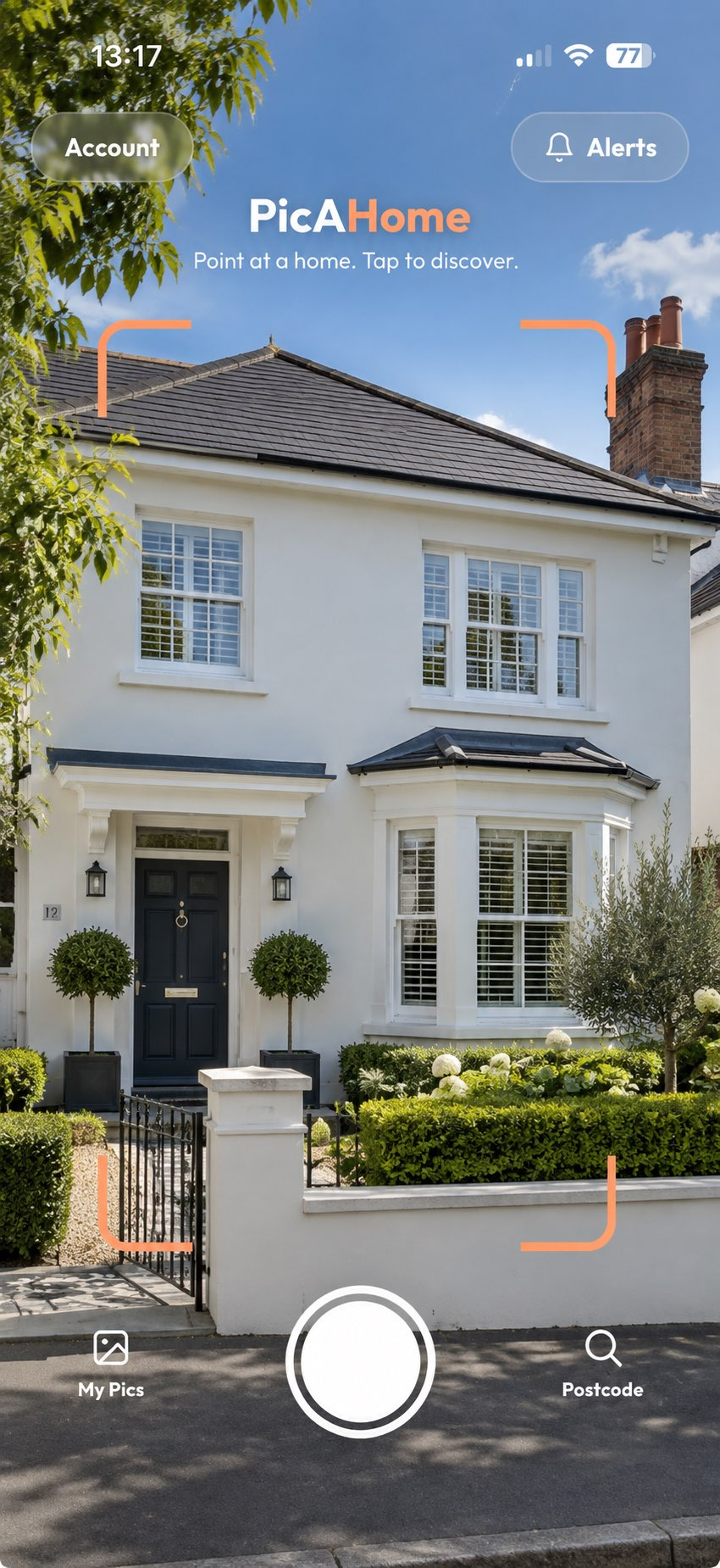
You're walking through an area you don't know well and one house stops you. You don't have the number. You don't know the postcode. You just want to know what it sold for, whether it's ever been on the market, and what homes around here go for. Or you're simply house hunting in a new area with no address in mind at all, trying to get a feel for what's out there. Either way, you can work a lot of it out without an address, and with PicAHome you can point your phone at the house and let the app identify it for you.
- You can search for properties without an address: by area, by postcode or street, on foot, or by pointing your phone at a house.
- Property portals let you search a whole town, draw an area on a map, or search a commute radius.
- Postcode and street searches show every home on a street, including sold prices.
- Local estate agents know about homes before they appear on the portals.
- PicAHome starts from the house itself: point your camera and choose from the closest matches, then see homes currently for sale nearby.
What are the best ways to search for properties without a specific address?
The most effective options are searching by area on the property portals, browsing a whole postcode or street, exploring the area in person, speaking to local estate agents, or using an app such as PicAHome to discover properties while you're out and about.
- Property portal map and area searches. Rightmove and Zoopla let you search a whole town, draw a circle around an area you like, or search within a commute. This is the quickest way to see what's on the market across a wide area, though it only covers homes currently listed.
- Postcode and street searches. If you know the street you're interested in, a postcode lookup shows every home on it. Our guide to finding the house prices on your street covers what you can see this way, from sold prices to what's currently for sale.
- Exploring an area in person. Nothing beats walking the streets. You get a feel for the roads, the noise, the schools and the shops that no listing conveys, and you often spot homes you'd never have found through a filtered search.
- Local estate agents. Agents covering the area know streets that rarely reach the portals and homes about to be listed. Register with the independents as well as the big chains; a good local agent is still one of the best sources of what's genuinely available.
- PicAHome. When you're exploring in person, PicAHome lets you point your phone at a property without knowing its address. It works out which home you mean, so you can see its sold-price history and property details, and homes currently for sale around that location where that information is available. Our guide to researching an area before buying covers the wider checks worth doing.
How can I find out about a house without knowing the address?
Work out the street name, use a map's street-level imagery to match the house and read off its number, then search that address in the sold-price records. Or use an app that identifies the property from your camera and location, which skips the first two steps.
Pinning down the exact house you've seen
All of these work. They just take a few steps.
- Find the street, then the number. Note the road name from a sign, then count along using street-level imagery on an online map until the house matches.
- Search the postcode. Once you know the street, a postcode lookup gives you the homes on it. The Royal Mail postcode finder is the official source for UK postcodes.
- Check the sold-price records. With an address, search HM Land Registry's Price Paid Data for what it sold for and when.
- Search the property portals. If the home has been listed in recent years there may be an old listing with photos, floorplan and description.
- Look at planning records. Your local council's planning portal shows applications made at an address, including extensions, conversions and refusals.
Notice the pattern: most traditional property searches start with an address or postcode. The house is right there in front of you, and the first task is still to turn it into a line of text.
How PicAHome finds the house in front of you
PicAHome uses your location and the direction you're pointing your phone to work out which home you mean, so you can discover properties while you're exploring without typing an address.
The Discovery process has three steps:
- Point. Point your camera at the home that caught your eye, from a street you're walking down or a car you're slowing down in.
- Discover. PicAHome shows the closest matching homes so you can pick the right one.
- Know. Open the Discovery to see the home's sold-price history, key property details, what's currently for sale around that location and information about the surrounding area.
That last point matters if you're house hunting in an unfamiliar area rather than chasing one specific house. Wherever you point the camera, you can see what's for sale around it, which is often how people stumble across a street they'd never have searched for.
Every Discovery is saved to My Pics, so the house you were curious about on Sunday is still there on Wednesday. You can save the ones that matter most, and watch a street to hear about new listings, price drops or homes going under offer on it.
PicAHome is free, and covers residential property in England and Wales. Your first full Discovery needs no account; a free account gives you unlimited Discoveries.
What if I'm no longer standing outside the house?
Search the postcode instead. PicAHome lists the homes on that street with what each last sold for, and lets you browse them on a map.
This is the route to take when you remember the road but not the number, or when you're back home at a laptop thinking about a house you saw on holiday. It's also useful for a broader question, such as what do homes on this street actually go for, because you're looking at a whole postcode rather than one property.
What can I actually find out about a house I've walked past?
Usually: what it last sold for, its earlier sale prices, basic property details, what's for sale near it now, and information about the surrounding area.
The sold prices come from the public record, so the same caveats apply wherever you look them up. Records for England and Wales start in January 1995, and a recent sale takes a while to appear after completion. Our guide to finding out how much a house sold for covers those limits properly. If the home has changed hands several times, the full property sale history is often more revealing than the latest figure alone. If you are weighing up an offer rather than simply curious, see how to research a house before buying it.
How do I find properties for sale near where I am?
Search "houses for sale near me" on a property portal for a live, location-based list. Where the data is available, PicAHome also shows homes currently for sale around the location you're exploring, including asking prices and links to the listings.
And if nothing is on the market today, you can watch the street. PicAHome can let you know when a new home is listed on it, when an asking price changes, or when a property goes under offer, which matters, because the house you like probably isn't for sale on the day you walk past it. Our guide to finding out if a house is for sale covers the other ways to check.
Is it nosy to look up a house you've walked past?
No. Sold prices for residential property in England and Wales are published as public open data, and they don't identify the buyer or the seller.
You're looking at a record of a transaction, not at anyone's personal information. Curiosity about the homes around you is normal, and it's the reason we built PicAHome.
Frequently asked questions
What are the best ways to search for properties without a specific address?
How can I search for houses in an area without knowing the address?
Can I find properties for sale near where I am?
How do I find a house I spotted while driving or walking?
Can I find out how much a house I saw sold for?
Do I need the postcode to look up a property?
Seen a home you're curious about?
Point. Discover. Know.
Download PicAHome and start discovering the properties around you. Free, with unlimited Discoveries on a free account.
Scan to download PicAHome and start discovering.
Keep reading
App update: explore properties with just a postcode
Our latest update lets you explore homes by postcode and follow new listings, price changes and planning decisions. No exact address needed, and completely free.
Read articleCan you find a house online just from a photo?
Visual search identifies images. Property discovery identifies a home and the records attached to it. Here's the difference, and what you can actually find from a photo.
Read articleHow to find out if a house is for sale
Portals, agents, boards and off-market sales — how to check whether a particular house is on the market, and what your options are when it isn't.
Read article